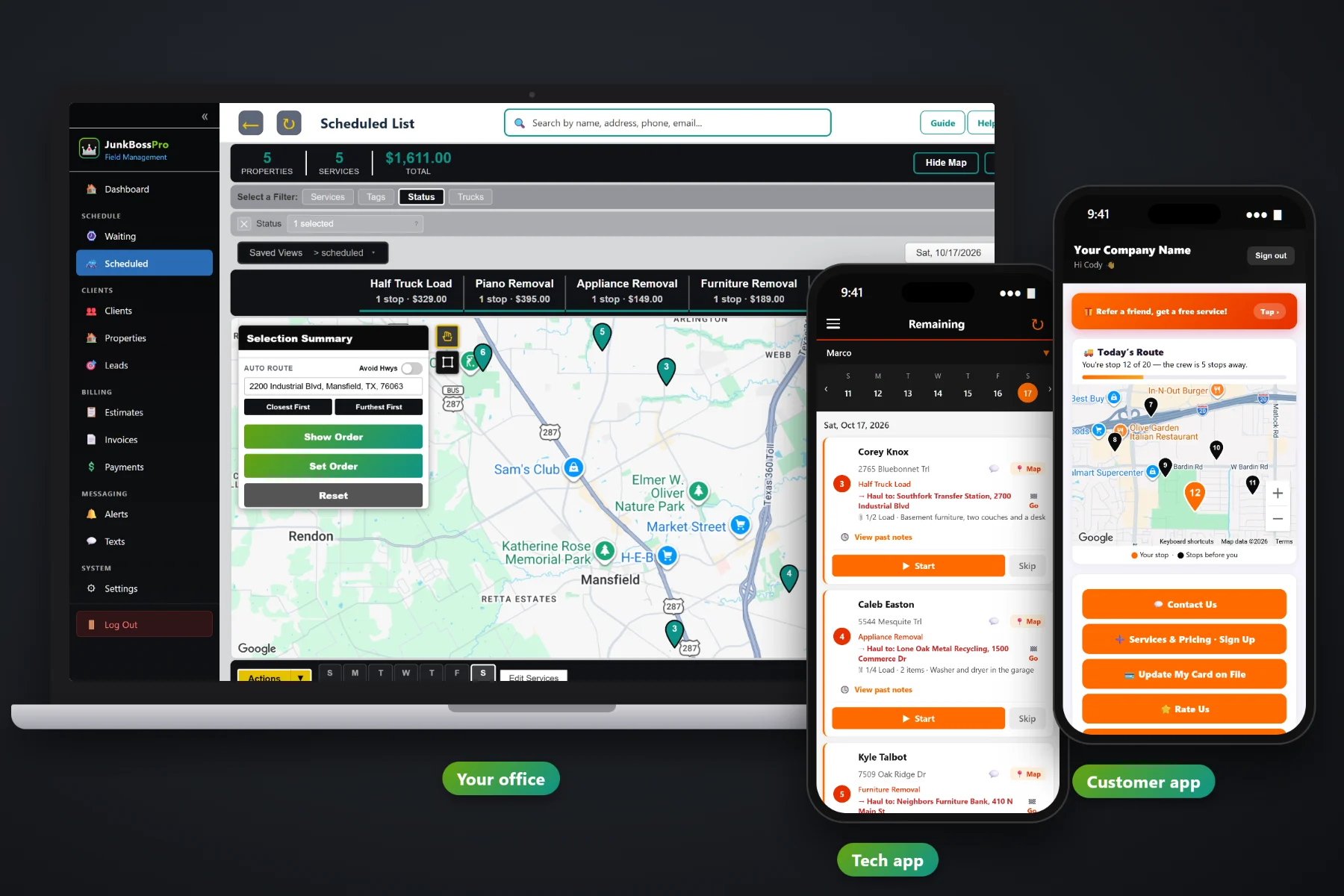
A junk removal job is priced by the load, the item or the cleanout, and the real cost is not known until the dump ticket comes back. JunkBossPro builds the invoice from the job: line items from your service list, sales tax, the dump fee overage worked out from the tons on the ticket, and a card-on-file charge the moment the crew taps Complete. Customers can pay online from the customer app, property managers get one monthly statement, and past-due invoices get followed up.
Plans start at $59/month, and invoicing, card on file, auto-charge and online payment are part of every plan. To see how billing fits with the Waiting List, dispatch, the crew app and quotes, start at JunkBossPro and then dig into the money side here.
Half truck load, mattress, same-day service: every line comes from your own service list, with sales tax added on the invoice.
Enter the ticket's tons, the tons included and your per-ton rate. The overage lands on the invoice by itself.
When the crew taps Complete, the invoice is created and the card on file can be charged before the truck pulls away.
Charge on completion or on a schedule, so nobody in the office has to remember to run cards on Friday.
Customers see their invoices, pay online and update their card without calling you.
Property managers and realtors set to Monthly get one statement covering every address, each line labeled.
Every junk removal job in JunkBossPro carries the truck load, the number of items, what's going and where it was hauled. When the dump ticket comes back heavy, you enter the tons and the overage is figured and added for you. The customer sees a clear invoice with lines they recognize, not one lump number they want to argue about.
Most junk removal owners do their invoicing at night, from a pile of notes and dump tickets on the truck seat. JunkBossPro moves that work to the moment the job is done, so the evening is for dinner instead of data entry.
Single items, quarter, half, three-quarter and full loads, cleanouts, trash-outs and same-day service, each with your own price and sales tax setting.
An approved estimate becomes the scheduled job with its lines already on it. Sign-ups from your website can come in with a card captured.
The crew app creates the invoice from the job and can charge the card on file right there in the driveway.
Overage from the dump ticket, online payment in the customer app, past-due follow-up and monthly statements for property managers.
A plain invoicing app gives you a blank line and a price box. A junk removal invoice has a load size, a pile of items, a weight that came back from the scale and, for some customers, a dozen addresses that all belong on one bill.
Ask a junk removal owner where the money leaks and you will hear the same things: a heavy load of shingles where nobody billed the extra weight, a customer who said they would pay later and never did, a property manager with eleven separate invoices nobody can match up, and a stack of dump tickets in the glove box waiting to be typed in.
Those leaks close when billing is tied to the job itself. When the load, the items and the ticket weight live on the job, the invoice writes itself and the card gets charged before anyone forgets.
JunkBossPro keeps the quote, the job, the dump ticket and the payment in one place, from the first phone call to the paid invoice.
Every tool here exists to get each load billed correctly and paid quickly, with less time at the kitchen table after the trucks come home.
Loads, single items, cleanouts and add-ons each on their own line, priced from your service list.
Sales tax added on the invoice, so the total is right without a calculator.
Ticket tons minus included tons times your per-ton rate, added to the invoice automatically.
Min Load, 1/8 through 7/8, Full Load, 1.5, 2 or 3 loads, recorded with the job the invoice comes from.
Days included in the price, then a daily rate for every extra day the dumpster sits.
Cards captured on your website sign-up form or updated by the customer in the customer app.
Complete in the crew app creates the invoice and can charge the card on file on the spot.
Charge automatically on completion or on a schedule you set.
Customers see their invoices and pay online from the customer app.
Unpaid invoices get followed up, and two-way texting lets the office nudge a customer directly.
One statement a month for a property manager or realtor, every address labeled on its own line.
The approved estimate becomes the job, so the price the customer agreed to carries through.
Photos from the crew app stay with the job, so a disputed invoice has proof behind it.
See what was billed, what was paid and what is still outstanding.
Works in the US, Canada, Australia, New Zealand and the UK, billing customers in their own currency.
Start $59, Pro $89 and Crew $199 per month, with billing on every plan.
A homeowner with a garage full of junk wants to pay and be done. A property manager with a dozen move-out trash-outs a month wants one statement their accounting person can check line by line. JunkBossPro handles both: card-on-file charges at completion for one-time customers, and Monthly accounts that roll every address onto one statement. For a full walkthrough of every piece, read Junk Removal Invoicing Software: The Complete Guide to Billing Every Load, Item and Cleanout.
The fewer calls about invoices, the more time the office spends booking loads. In the customer app, customers see their invoices, pay online and update their card on file. They also see the route on their pickup day, request more service and refer a neighbor. When a card fails or an invoice sits unpaid, past-due follow-up and two-way texting with the office get it closed out.
Pick the plan that fits your trucks. Every plan starts with a 14-day free trial and no credit card.
Compare plans on the pricing page.
On the job, you enter the tons from the dump ticket, the tons included in the price and your per-ton rate. JunkBossPro works out the difference and adds it to the invoice as its own line, for example "Dump fee overage (0.28 tons @ $70.00) = $19.60". If the load came in under the included weight, no overage is added.
Yes. When the crew taps Complete in the crew app, the invoice is created from the job and the card on file can be charged right then. Auto-charge can also be set to run on completion or on a schedule.
They can pay online from the customer app, where they see their invoices and can save or update a card for next time. Unpaid invoices get past-due follow-up, and the office can text the customer directly.
There is no separate deposit setting. For a big estate or hoarder-style cleanout, most owners bill the up-front amount as its own invoice or line item, then bill the balance when the job is complete.
Yes. Set the client to Monthly and they get one statement each month covering every address you worked at, with each line labeled by address.
Start is $59/month, Pro is $89/month, and Crew is $199/month. Invoicing and payments are on every plan, and every plan starts with a 14-day free trial with no credit card.
Billing is one piece of how JunkBossPro runs a junk removal company. For the Waiting List, dispatch, the crew app, quotes and customer texts, see the full JunkBossPro platform overview.
Practical reading on line items, sales tax, dump fee overage, card on file, charging at completion, auto-charge, online payment, past-due follow-up, cleanout deposits, monthly statements, dumpster drop days, reports and cash flow.
Line items, sales tax, dump fee overage, card-on-file charges at completion, online payment and monthly statements for property managers. Try JunkBossPro free for 14 days.